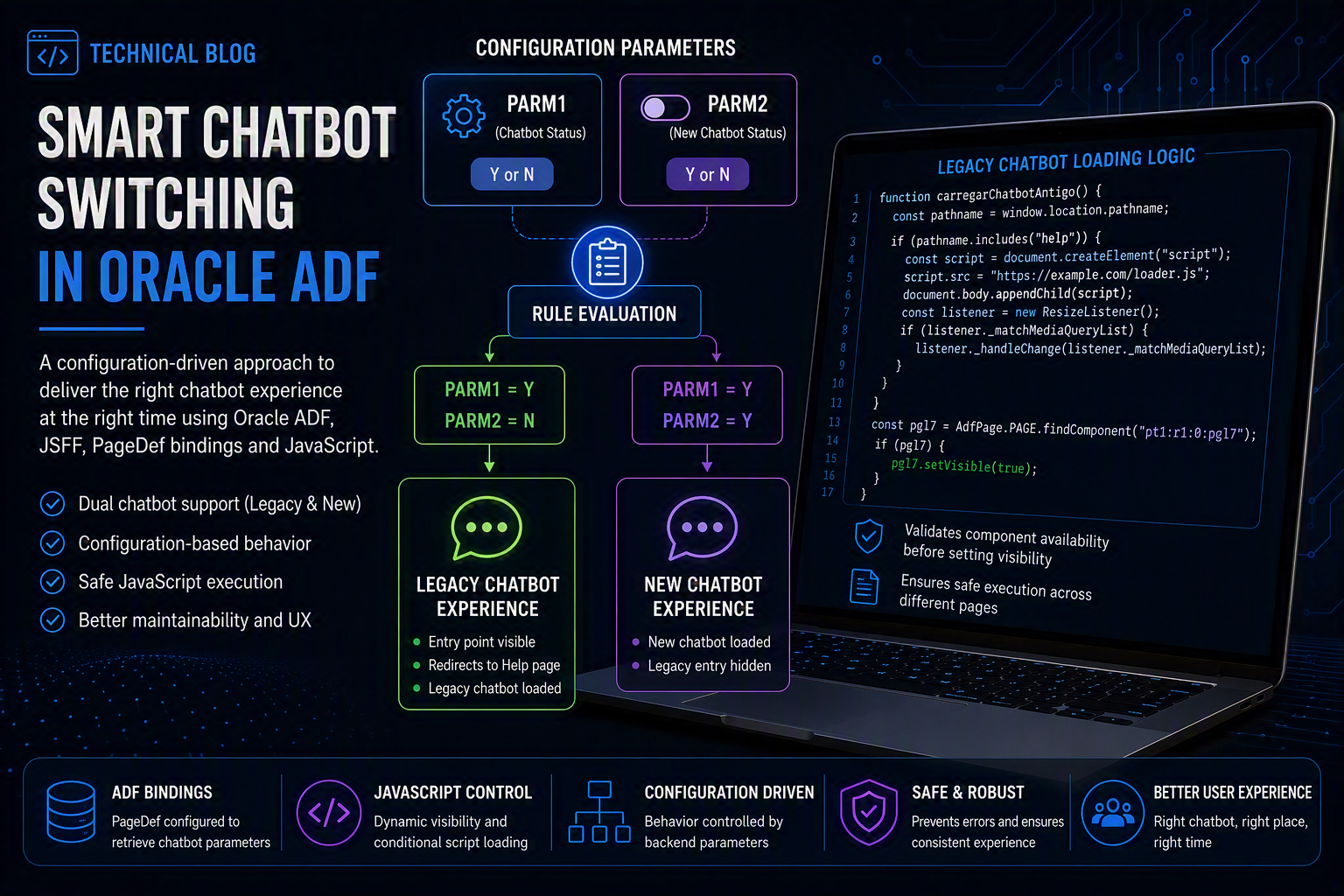

In enterprise applications, small user interface decisions can have a significant impact on maintainability, user experience, and operational flexibility. This was exactly the case in a recent improvement implemented in the application, where we needed to control which chatbot experience should be available to users based on backend configuration parameters.
The challenge was simple in concept: depending on the system configuration, the portal should either display the legacy chatbot entry point or activate the new chatbot experience directly. However, because the application uses Oracle ADF, JSFF pages, PageDef bindings, and JavaScript integration, the implementation required careful handling of component visibility, page context, and runtime behavior.
The Business Requirement
The Business Requirement
- Legacy chatbot
- New chatbot
The behavior is controlled by two configuration parameters:
CHATBOT STATUS
NEW CHATBOT STATUS
These parameters are maintained in the backend configuration and retrieved by the portal at runtime.
The expected behavior is:
CHATBOT STATUS = Y
NEW CHATBOT STATUS = N
In this scenario, the legacy chatbot should be active. The car-shaped chatbot image, represented by the pgl7 component, must be displayed on the home page. When users click the image, they are redirected to the Help page, where the legacy chatbot icon is loaded and remains available for interaction.
CHATBOT STATUS = Y
NEW CHATBOT STATUS = Y
In this scenario, the new chatbot should be active. The new chatbot is loaded directly on the portal, and the pgl7 component remains hidden, preventing users from accessing the legacy chatbot entry point.
Default Component Behavior
To avoid showing the legacy chatbot entry point before validating the configuration, the pgl7 component was configured as hidden by default:
<af:panelGroupLayout
    id="pgl7"
    visible="false">
This means the car chatbot image is not displayed automatically when the page loads. Instead, its visibility is controlled dynamically by the JavaScript logic, based on the chatbot configuration returned by the service.
This approach helps prevent users from accessing the legacy chatbot when the new chatbot is enabled or when the chatbot configuration does not allow it.
Retrieving the Chatbot Configuration
The portal uses ADF bindings to retrieve the chatbot configuration values. The service returns records that identify which chatbot behavior should be applied.
The relevant values are exposed through the page definition and accessed by the JSFF page using an ADF iterator:
<af:iterator value="#{bindings.results1.collectionModel}"
             var="row"
             id="obj1">

    <af:panelFormLayout id="obj2" visible="false">

        <af:outputText
            value="#{row.FIELD1 eq 'PARM1' ? row.FIELD2 : null}"
            id="obj3"/>

        <af:outputText
            value="#{row.FIELD1 eq 'PARM2' ? row.FIELD2: null}"
            id="obj4"/>

    </af:panelFormLayout>

</af:iterator>
The values are then interpreted by JavaScript to determine whether the legacy chatbot or the new chatbot should be enabled.
JavaScript Logic for the Legacy Chatbot
The function responsible for enabling the legacy chatbot behavior is carregarChatbotAntigo().
This function performs two main actions:
- It loads the legacy chatbot script when the user is accessing the Help page.
- It makes the pgl7 component visible when the component is available on the current page.
A simplified version of the function is shown below:
function carregarChatbotAntigo() {
    const pathname = window.location.pathname;
    console.log(pathname);

    if (pathname.includes("hlp")) {
        var _srcchatbotWC = document.createElement("script");
        _srcchatbotWC.src = "../loader.js";

        document.body.appendChild(_srcchatbotWC);
        var listener = new ResizeListener();

        if (listener._matchMediaQueryList) {
            listener._handleChange(listener._matchMediaQueryList);
        }
    }

    let pnl = AdfPage.PAGE.findComponent("pgl7");

    if (pnl) {
        pnl.setVisible(true);
    }
}
One important adjustment was added to avoid JavaScript runtime errors. Before calling setVisible(true), the function validates whether the pgl7 component was actually found:
if (pnl) {
    pnl.setVisible(true);
}
This validation is necessary because the same JavaScript file can be executed in different pages, and not all pages contain the pgl7 component. Without this validation, the application could throw an error when AdfPage.PAGE.findComponent(…) returns undefined.
Why This Validation Matters
During testing, the JavaScript logic worked correctly when the pgl7 component was available. However, when the same function was executed on a page where pgl7 was not present, the following type of error occurred:
Cannot read properties of undefined
The root cause was that the script attempted to call:
pnl.setVisible(true);even when ajudaPanel was undefined.
By adding the validation:
if (pnl) {
    pnl.setVisible(true);
}
the function became safer and more resilient. It now only changes the component visibility when the component exists in the current page context.
Resulting Behavior
After the implementation, the portal supports the following behavior:
Legacy chatbot enabled
CHATBOT STATUS = Y
NEW CHATBOT STATUS = N
The car chatbot image is displayed on the home page. When users click the image, they are redirected to the Help page, where the legacy chatbot icon is active and available for interaction.
New chatbot enabled
CHATBOT STATUS = Y
NEW CHATBOT STATUS = Y
The new chatbot is loaded directly in the portal. In this case, the pgl7 component remains hidden, so users do not access the legacy chatbot entry point.
Technical Benefits
This implementation provides a few important benefits:
- Configuration-driven behavior: the chatbot experience can be controlled by backend parameters without requiring code changes.
- Improved maintainability: the portal can support both the legacy and new chatbot during a transition period.
- Safer JavaScript execution: the function validates component availability before interacting with ADF components.
- Better user experience: users are directed to the correct chatbot experience based on the active configuration.
- Reduced risk: the legacy chatbot and new chatbot are not exposed at the same time when the configuration does not allow it.
Final Thoughts
This improvement is a good example of how configuration-based logic can make enterprise applications more flexible and easier to maintain. By combining Oracle ADF bindings, JSFF components, and defensive JavaScript checks, the portal can dynamically control the chatbot experience without exposing users to inconsistent behavior.
Although the change may look small from a user interface perspective, it provides an important foundation for managing feature transitions safely, especially when legacy and new components need to coexist during a migration or rollout phase.
In enterprise systems, this kind of controlled activation is essential. It allows teams to introduce new features gradually, reduce operational risk, and keep the user experience consistent across different application states.
Leave a Comment